How to Rescue a Magento 2 Store Without Rebuilding It

Vlad Kozak

Most Magento 2 stores don't need to be rebuilt — they need to be rescued. Here's the exact 4-stage framework we've used on 70+ projects to fix slow Magento sites and bring broken stores back to life.
Three things usually happen before a Magento 2 store owner reaches out to us.
The checkout starts throwing 500 errors during the busiest hour of the day. PageSpeed scores drop into the red, and organic traffic drops with them. The previous developer "isn't responding" anymore — phone calls, emails, Slack, all silent.
And the question they ask is almost always the same: "Do we have to rebuild the whole thing?"
In most cases — no.
I'm Vlad Kozak, CEO & founder of STAGEM. Over the past seven years, our team has taken on more than 70 Magento projects, and the majority came to us already broken in some way. This methodology was the basis of my talk at Magento Meet Ukraine 2025 — and what I shared there is what I'm sharing here: a full Magento store rescue rarely requires a full rebuild. What works is a structured reanimation — fixing the right things, in the right order, without throwing away what's already there.
The reason this approach to fixing slow Magento 2 stores works for about 80% of cases is straightforward. Most Magento problems aren't caused by Magento itself. They're caused by configuration mistakes, abandoned modules, missed updates, and accumulated technical debt — all fixable without nuking the whole store.
Here is one of our recent success stories based on Luma:
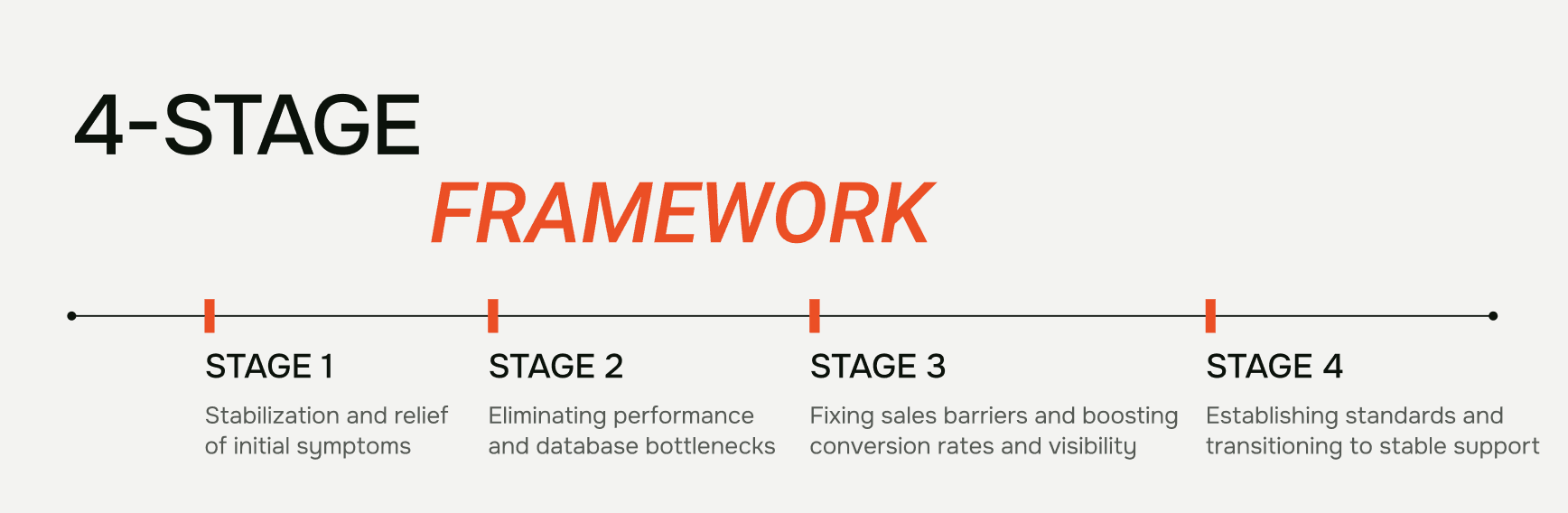
The 4-Stage Magento Store Rescue Framework
Before the stages themselves, the most important thing about this framework is the order.
A common mistake — one we've watched other agencies make repeatedly — is starting with the visible problems first. The conversion work, the UX redesign, the new features. It feels productive. The client sees changes. But if the foundation is unstable, you're polishing a sinking ship.
Each stage below has a clear goal, and each stage's work becomes meaningfully harder if you skip the one before it. This is the core of the rescue methodology I presented at Magento Meet Ukraine 2025.
Stage 1: Stabilization — The First Phase of Magento Store Rescue (Weeks 1-2)
The goal: stop the bleeding. Get the store reliably online before optimizing anything.
Stage 1 starts with a comprehensive audit — Magento version and patch level, server config, log analysis, indexer status, cron health, full module list. Roughly half the time, the audit alone reveals the root cause of whatever brought the store owner to us.
From there, we work the stabilization checklist. Set Magento to production mode (you'd be surprised how many "slow" stores are just running in developer mode). Enable JS/CSS merging and minification. Convert images to WebP and turn on lazy loading. Move cron to a dedicated worker and verify it's actually running.
Caching is where Stage 1 gets the biggest wins for fixing slow Magento performance. Redis for sessions and backend cache. Varnish or LiteSpeed for full-page caching. These two changes alone often cut TTFB by 60-70% on stores running with file-based caching.
Security gets a baseline pass — 2FA for all admins, basic Content Security Policy, and most importantly, automated backups. Nothing is worse than diagnosing critical issues without a recent backup to test fixes against.
After Stage 1, the store stops embarrassing you. It's not fast yet, but it stops crashing. Customers can complete checkout. You can sleep.
Want the full Stage 1 checklist? We've documented our 12-point Magento audit process — the exact checks we run before touching any production code.
Stage 2: Magento 2 Performance Optimization and Database Tuning (Weeks 2-4)
The goal: now that the patient is stable, find what's actually slow.
Magento 2 performance optimization in Stage 2 starts with server configuration — PHP-FPM tuning, OPcache settings, web server config. Unglamorous work, but it pays compound interest because every request runs through these settings.
Then comes the module audit. Using a profiler like Blackfire, we identify which extensions are eating CPU on every request. The pattern is almost always the same: two or three modules consume 70% of the runtime.
Database optimization is its own discipline. The cron_schedule table on a neglected store can grow to millions of rows, slowing every cron run. Tables fragment over years of imports. Indexes are missing where they're needed.
One important update if you've been on Magento for a while: as of Magento 2.4.8 (April 2025), Elasticsearch is no longer supported. The platform now uses OpenSearch 2.19. If you're upgrading from 2.3.x or older 2.4.x versions, the OpenSearch migration is mandatory.
Cron deserves special mention because runaway cron processes are one of the most common causes of "the server is on fire at 2 AM" calls. We've written a full guide on Magento 2 cron optimization if you want to dig into it. (Internal link to Cluster Article #3)
For the developers in the room, we've also documented 9 specific code-level patterns we fix most often during Magento performance optimization — replacing repeated save() calls with insertOnDuplicate(), using fetchCol instead of fetchAll, proper transaction handling for bulk operations.
Stage 3: Conversion and Visibility (Weeks 4-6)
The goal: the store is fast and stable. Now make it actually sell.
This is where most agencies want to start, and it's why most rescues fail. Conversion work on an unstable foundation is wasted effort.
Stage 3 begins with analytics — auditing GA4 to make sure every ecommerce event fires correctly. We've seen stores where add_to_cart was firing twice and purchase wasn't firing at all. The marketing team had been making decisions on garbage data for months.
Real PageSpeed work happens here, focused on Core Web Vitals from real user data — LCP, INP, CLS measured across desktop and mobile. CDN and basic WAF go in via Cloudflare. Technical SEO foundation gets rebuilt: clean sitemap, proper robots.txt, redirect chain elimination, canonicals, hreflang for multi-store setups.
We test the key user flows end-to-end — anonymous checkout, logged-in checkout, mobile, desktop. The number of stores where "Continue as guest" is broken on mobile Safari would surprise you.
CRM integrations get audited. Automated tests get written for critical paths so future deploys don't silently break checkout.
Stage 4: Standards and Stable Support (Week 6+)
The goal: make sure the store doesn't slide back into the broken state we just rescued it from.
This is the stage most rescues skip. It's also why some stores end up needing rescue twice.
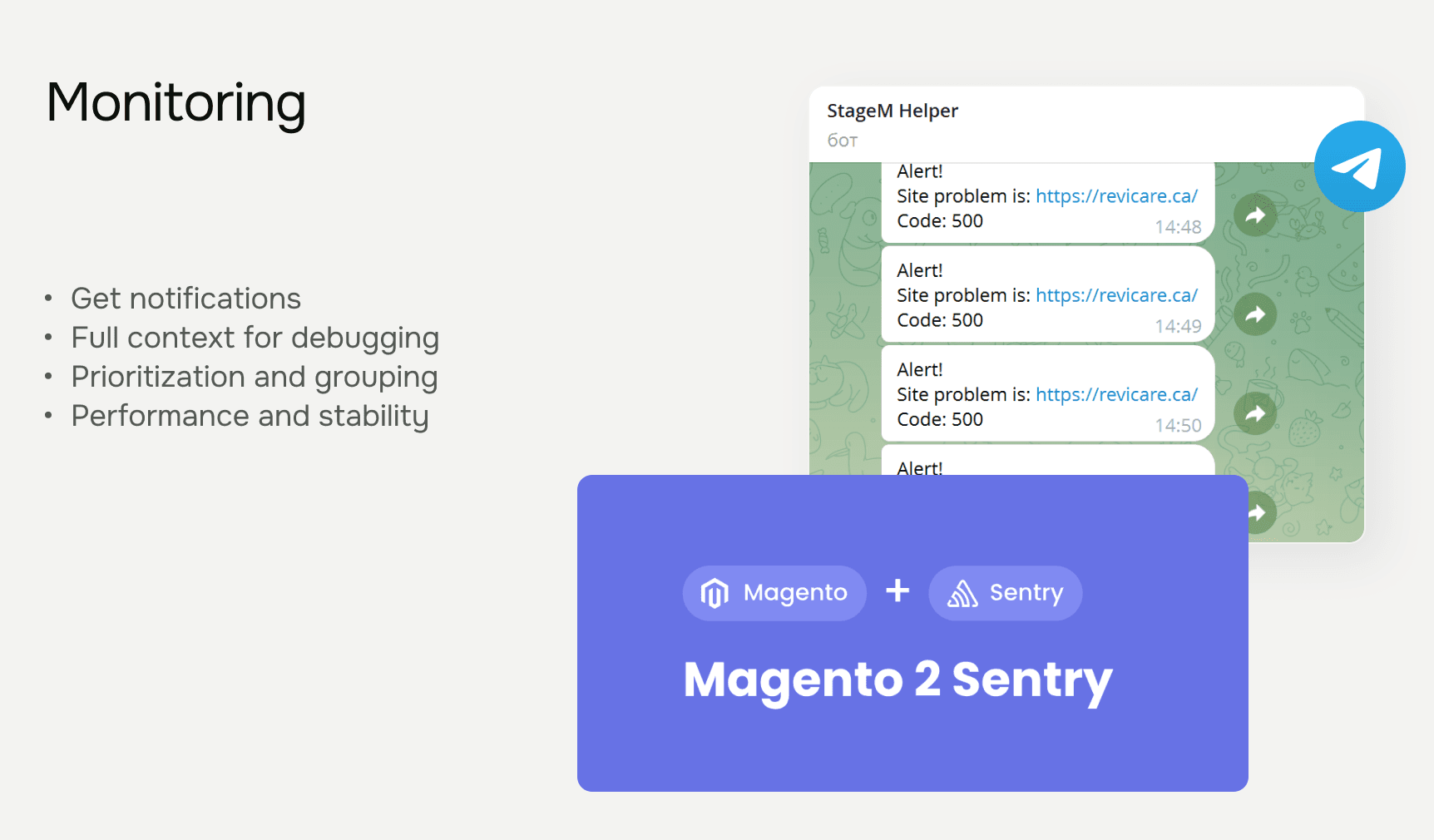
Monitoring goes in first — real-time error tracking with Sentry, integrated into the deployment pipeline. Uptime monitoring with alerts to a channel the right people actually read.
Backups get the serious treatment. Not just configured, but tested. We restore the most recent backup to staging monthly, because an untested backup is just a hopeful guess.
The deploy process gets standardized. Documentation gets written, including a runbook for common issues. Business metric dashboards get set up so the team can see store health at a glance.
We schedule quarterly audit sessions. Magento moves quickly, and a store perfectly tuned today will need adjustment in six months.
After Stage 4, ongoing maintenance is light. The team can focus on growth instead of fighting fires.
A Real Example: Rescuing F-ONE Ukraine
The framework is theory until you see it applied. Here's what a complete Magento store rescue looked like on one specific project.
F-ONE is a French watersports brand specializing in kitesurfing and foiling equipment. Their Ukrainian store had grown organically over several years and arrived at our door with the typical reanimation profile — slow page loads, inconsistent mobile performance, and a checkout flow leaking conversions.

Stage 1 focused on basics that had been overlooked: caching configuration, image optimization, and a server config untouched since the original launch. Stage 2 dealt with module bloat — several extensions running redundant database queries on every page request. Stage 3 brought the full Magento 2 performance optimization cycle and a clean Core Web Vitals pass.
The results, measured after the full reanimation cycle:
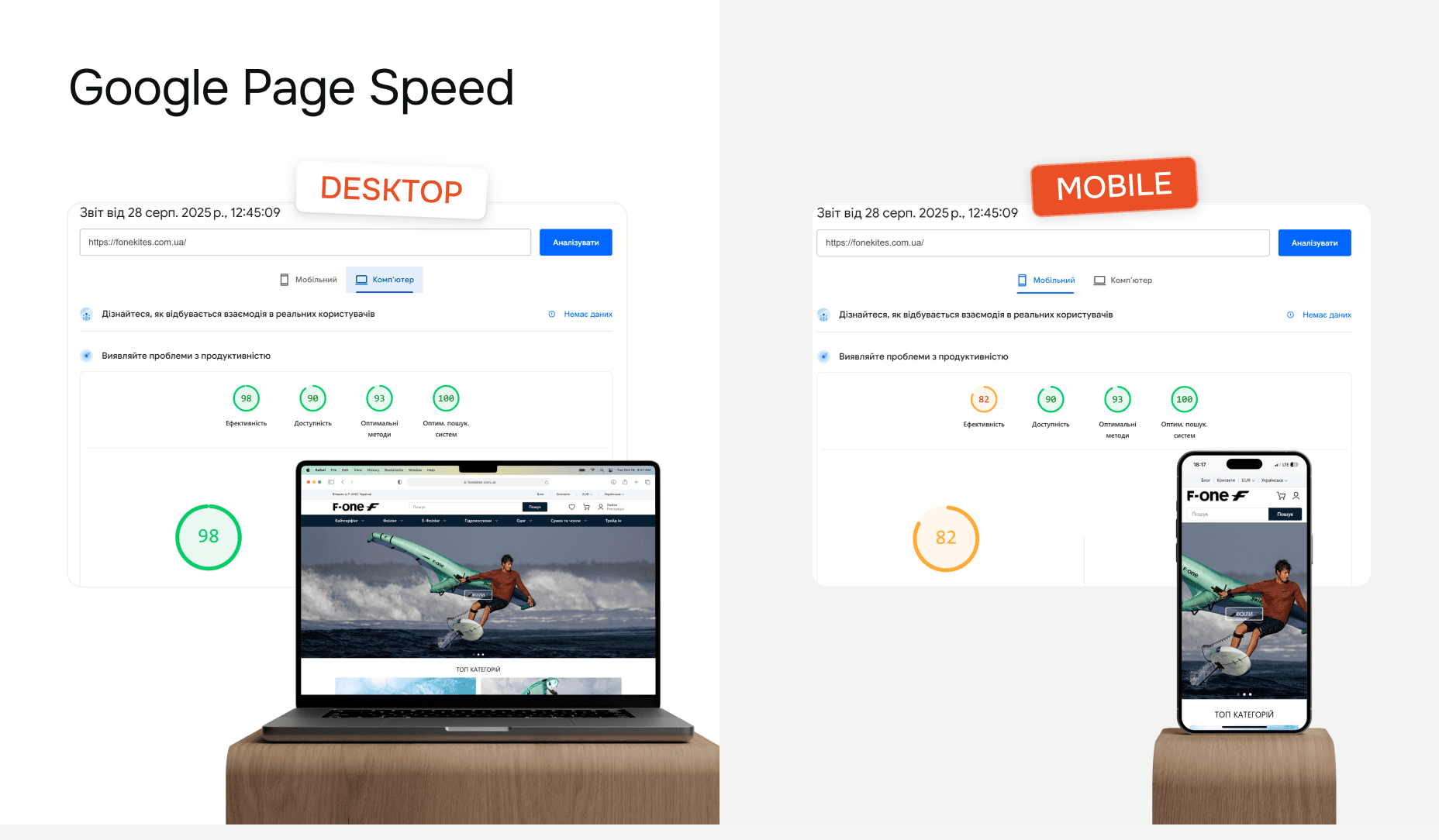
Google PageSpeed Insights:
98/100 desktop, 82/100 mobile
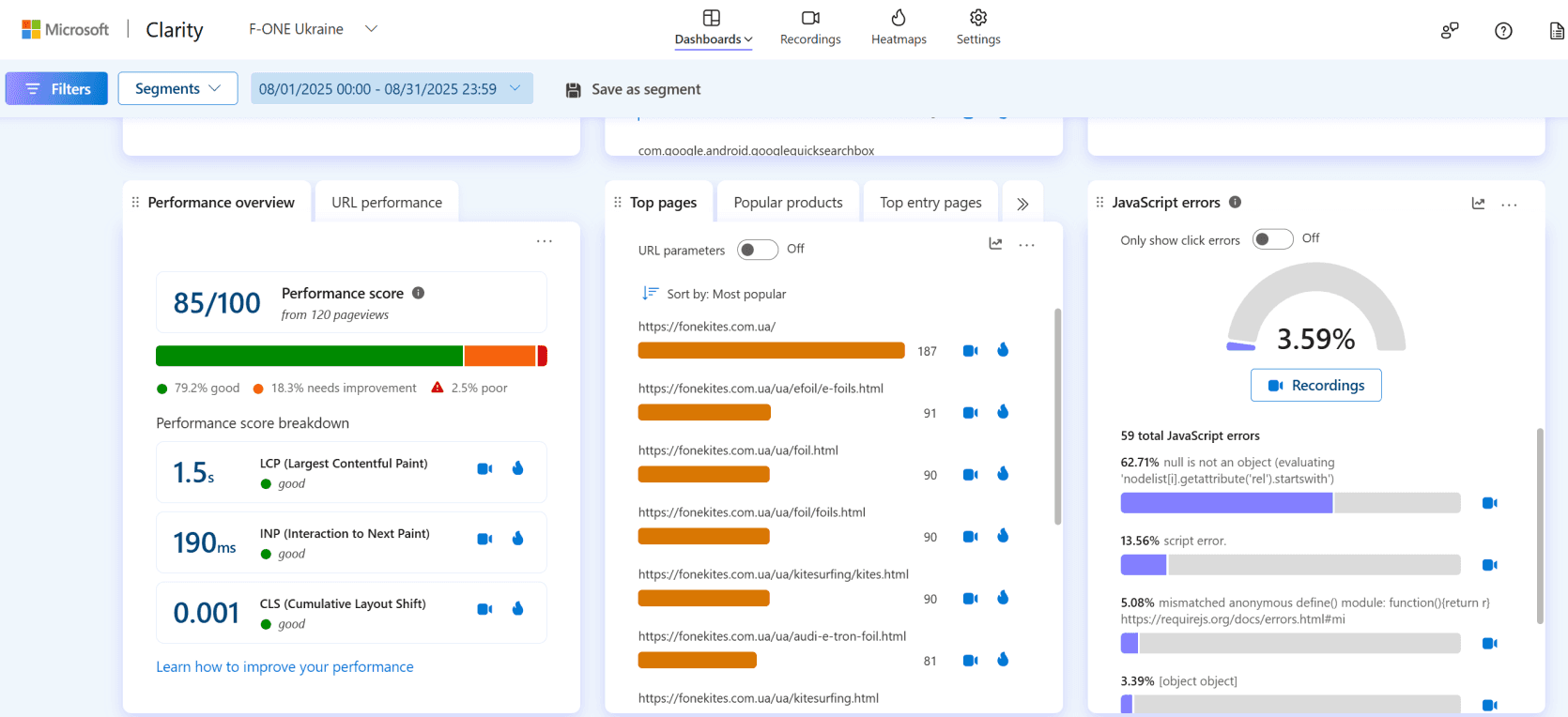
Microsoft Clarity (real user data):
Performance score: 85/100
LCP: 1.5s (good)
INP: 190ms (good)
CLS: 0.001 (good)
The numbers matter, but the operational outcome mattered more. The team stopped getting alerts at 2 AM. The marketing team trusted their analytics again. Customer service tickets about checkout problems dropped to nearly zero.
Want the full breakdown? Read the complete F-ONE case study with the technical details, timeline, and lessons learned.
When Rebuild Makes More Sense Than Rescue
A Magento store rescue isn't always the right answer.
About 20% of the projects we evaluate genuinely need a rebuild, not a rescue. We tell those clients to rebuild — even though it means less revenue for us — because trying to rescue a project that should be rebuilt costs the client more long-term.
Three signals point to rebuild:
Core files modified throughout the codebase. When a previous developer edited Magento core instead of building proper modules, the upgrade path is essentially closed. Every patch has to be manually merged. At some point, maintaining this exceeds the cost of starting fresh.
Eight or more Magento versions behind, with extensive customization. A store on 2.3.4 with 50 custom modules can technically be upgraded, but the upgrade itself becomes a multi-month project with high regression risk. If you'll spend that effort anyway, a rebuild on the current version often makes more sense.
Custom CMS built inside Magento. If a developer built blog systems, landing page builders, or content workflows directly inside Magento, that's an architectural mismatch. Magento is an ecommerce platform; trying to make it a general-purpose CMS results in fragile systems.
If none of these apply, you're almost certainly a Magento store rescue candidate. If two or three apply, rebuild is probably the right call.
Conclusion: Reanimation Is the Boring Answer
The four-stage framework — stabilization, performance optimization, conversion, standards — isn't exciting. It's just the order in which fixing slow Magento stores actually works.
Rebuilding a Magento store is romantic. Clean slate, modern stack, no legacy decisions to inherit. We understand the appeal. But for most stores, rebuild is the more expensive answer to a problem with a cheaper solution.
If your store has the symptoms we described at the start, here are two next steps:
Self-serve: Download our Practical Magento 2 Reanimation Plan — the exact checklist we use on every Magento store rescue, formatted as a self-assessment you can run on your own store.
Talk to us: Book a 30-minute discovery call — we'll give you an honest take on whether your store is a reanimation or rebuild candidate. We genuinely tell 20% of the people we talk to that they should rebuild instead.
The worst thing you can do is keep patching symptoms while the foundation gets weaker. Magento stores in this state don't get better on their own.
About the Author

Vlad Kozak is the CEO and Founder of STAGEM, a Magento development agency that has delivered 70+ Adobe Commerce and Magento Open Source projects since 2018. He was a featured speaker at Magento Meet Ukraine 2025, where he presented the four-stage Magento store rescue framework outlined in this article.
His team specializes in performance optimization, technical audits, and rescuing struggling Magento 2 stores without full rebuilds.
More articles
Explore more insights from our team to deepen your understanding of digital strategy and web development best practices.





Load More