Magento 2 Cron Optimization: Why It's Killing Your Server (And How to Fix It)

Vlad Kozak

Magento 2 Cron Optimization: Stop Cron From Crashing Your Site
Magento 2 Cron Optimization: Stop Cron From Crashing Your Site
Magento cron is the silent engine of your store. When it works, you never think about it. When it breaks, almost everything starts breaking with it — emails stop sending, indexers fall behind, the admin panel slows down, and one day your server starts hitting 99% CPU at 2 AM for no obvious reason.
This article is the technical playbook we use to diagnose and fix Magento 2 cron issues in production. It's based on real cases we've worked through across 70+ Magento projects since 2018, and on the framework I presented at Magento Meet Ukraine 2025.
Before the technical content — a quick translation for non-technical readers, because cron problems hurt businesses, not just developers.
For Store Owners: Why This Matters
If you're not the developer, here's what cron actually does and why it matters for your business.
Cron is the background process that handles dozens of routine tasks in Magento — sending order confirmation emails, updating product indexes, processing scheduled imports, cleaning up sessions, regenerating sitemaps. Customers never see cron directly, but they feel it when it breaks.
When Magento cron is broken or misconfigured, three things happen:
Customer-facing problems get blamed on other things. Order confirmation emails arrive 6 hours late, but you blame the email service. Product prices update slowly across the catalog, but you blame the developer. Search results show outdated stock, but you blame the integration. Often the actual culprit is cron failing silently in the background.
Servers crash without obvious cause. Cron jobs that have been running fine for years can suddenly start consuming 99% of CPU because of a single misconfigured task or a database table that grew too large. Your hosting bill goes up. Your store gets slow. Nobody can immediately explain why.
Maintenance costs compound. A cron problem that goes undiagnosed for 6 months creates ten other problems on top of it. By the time someone fixes the root cause, the cleanup work is bigger than the original fix would have been.
If you're reading this and any of those scenarios sound familiar — forward this article to your developer or technical lead. Skip the technical sections in the middle. Read the conclusion at the bottom. We've put a non-technical action checklist there.
For everyone else — let's get into the technical detail.
How Magento Cron Actually Works
Before fixing cron problems, you need to understand the architecture, because Magento doesn't use a single cron job — it uses two separate processes, and the distinction matters.
The system crontab runs bin/magento cron:run on a fixed interval, typically every minute:
When this fires, Magento looks at the cron_schedule database table for any job with status pending and a scheduled_at time in the past. It marks them running, executes the job class, and on completion marks them success or error.
This means there are two layers of behavior to tune: the system cron interval (when does Magento check for work?) and the Magento-level job scheduling defined in module crontab.xml files (when should each individual job run?).
Most production cron problems stem from a mismatch between these two layers, or from individual jobs that misbehave at scale.
The Five Most Common Cron Problems (And How to Fix Them)
We'll walk through each problem in the format: symptom → diagnosis → fix.
Problem 1: Stuck Jobs and Runaway Processes
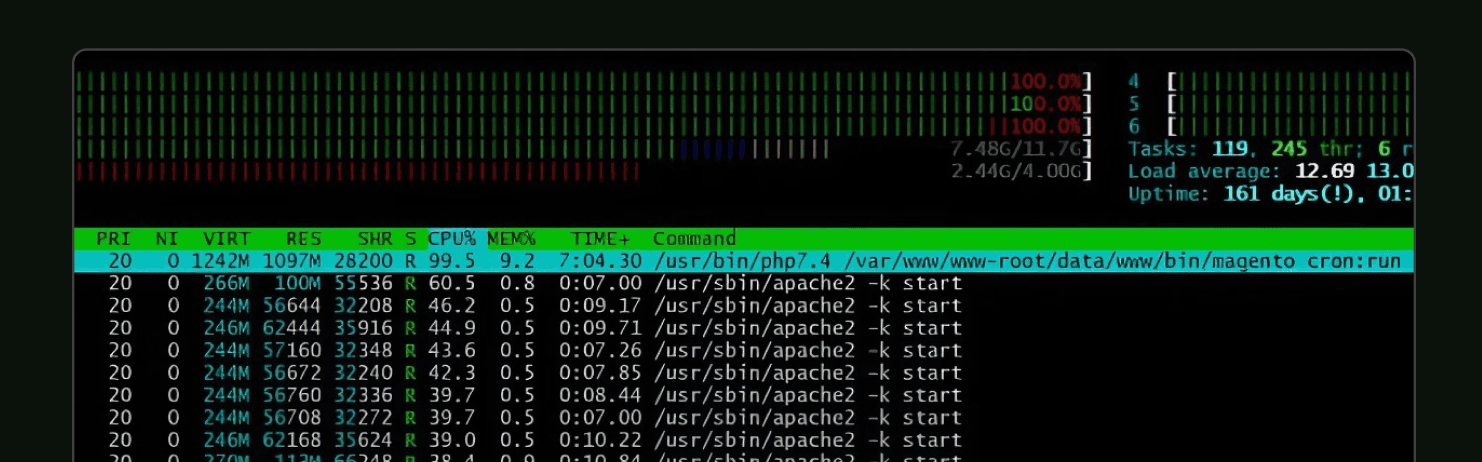
Symptom: Server CPU climbs to 99% and stays there. Cron processes accumulate but never complete. The store gets progressively slower.
Diagnosis: SSH into the server and run:
If you see dozens of bin/magento cron:run processes, you have a runaway. Then check the cron_schedule table:
If a single job has hundreds of "running" rows, that job is stuck — likely an unhandled exception that skipped the cleanup, a memory limit hit, or a deadlock that never released.
Fix:
Then investigate the specific stuck job — usually a third-party module with a bug, or a custom job that doesn't handle errors properly.
Real example: One store we audited had been running with stuck cron processes for so long that it had accumulated 161 days of uptime under sustained 99% CPU load. The fix took 30 minutes once we identified the misbehaving job. The store had been paying inflated hosting bills for nearly six months.
Problem 2: Bloated cron_schedule Table
Symptom: Cron itself becomes slow over time. New jobs take minutes to start. Database queries against cron_schedule show up in slow query logs.
Diagnosis: Check the size of the table:
If you see hundreds of thousands or millions of rows, every cron tick is doing a full table scan to find pending jobs.
Fix: Magento keeps cron history for 7 days by default, which is too long for high-volume stores. Reduce retention:
These values keep 24 hours of history (1440 minutes) and clean up every 10 minutes. For very high-volume stores, you can go shorter — 60 minutes of success history is fine if you're not actively debugging.
After changing config, manually clean up the existing bloat:
For tables in the millions of rows, do this in chunks of 50,000 to avoid locking the table.
Problem 3: Overlapping Cron Runs
Symptom: Multiple cron:run processes execute simultaneously, fighting over the same pending jobs. Some jobs run twice, others not at all. Server CPU spikes are erratic.
Diagnosis: With a 1-minute system cron interval and slow jobs, you can end up with dozens of overlapping PHP processes all trying to grab the same pending rows. Check process count:
If this returns more than 5-6 on a quiet store, overlapping is happening.
Fix: Use flock to ensure only one cron run executes at a time:
The -n flag makes flock non-blocking — if it can't get the lock, it exits immediately instead of queuing up. This single change eliminates overlap problems on most stores.
For heavier loads, split cron into groups (more on this in Problem 5).
Problem 4: Misconfigured Job Schedules
Symptom: A specific cron job runs far more often than it should — every minute when it only needs to run hourly. Server load spikes correlate with that job's schedule.
Diagnosis: Look at the crontab.xml files in your active modules:
Open each and check the <schedule> values. Common red flags:
The * * * * * (every minute) schedule is appropriate for very few jobs. Most jobs should run every 5, 15, or 60 minutes — or once a day.
Fix: If the misconfigured job is in a third-party module, override the schedule in your project config rather than editing the module directly. Add to app/code/YourCompany/CronOverride/etc/crontab.xml:
This preserves the original module while changing the schedule. Document the override so future developers know why it exists.
Real example: A custom integration module was configured to run
* * * * *— every minute. The job took 90 seconds to complete on a busy store, meaning it was always overlapping with itself. CPU usage averaged 99.55% during peak hours. Changing the schedule to*/10 * * * *reduced average CPU to 23%.
Problem 5: Single Group Bottleneck
Symptom: Lightweight jobs get stuck waiting behind heavy jobs. Email sends are delayed because the indexer is running. The default cron group is overwhelmed.
Diagnosis: Check the status distribution in cron_schedule:
If you see large numbers of missed (jobs that didn't run within their scheduled window) or pending jobs piling up, you have a bottleneck. By default, all jobs run in the default group sequentially. One slow job blocks everything behind it.
Fix: Split into multiple cron groups, each running independently. In your custom module's crontab.xml:
Then run each group separately in the system crontab:
Now slow indexers don't block email delivery. Heavy reports don't block customer-facing jobs. Each group has its own lock, so groups don't interfere with each other.
For very high-volume stores, you can also tune <schedule_generate_every>, <schedule_ahead_for>, and <history_cleanup_every> per group in the config — but that's an advanced topic worth its own article.
Monitoring: How to Know Cron Is Healthy
Fixing cron once isn't enough. Cron problems compound silently, so you need ongoing monitoring.
Database-Level Monitoring
Run this query weekly (or set up automated alerting):
Red flags:
Any job with
missedcount > 5% of total runsrunningrows older than the job's expected durationJobs that never appear in
successstatus
Application-Level Monitoring
Sentry, New Relic, or any APM tool with custom event support can track cron execution. The key metrics:
Cron run duration (should be stable; sudden growth signals a problem)
Failed cron jobs (should be near zero)
Backlog size (pending jobs older than expected)
We typically integrate Magento with Sentry for this and configure alerts when any of these metrics cross thresholds. The goal is to catch problems before customers do.
Server-Level Monitoring
At minimum, monitor:
CPU usage over 24-hour windows (look for sustained spikes)
Disk space in
/var/log(cron logs can balloon fast — see our note on log rotation below)MySQL connection count (if cron is using too many connections, customer requests get blocked)
Log rotation matters here. We've audited stores where the cron log file alone was 17GB because nobody had configured rotation. The log was so large that even reading recent entries took minutes. Use
logrotateto keep cron logs bounded.
[IMAGE: Cron status table showing success/missed/pending counts — slide 19 from your deck]
When Cron Problems Mean Bigger Problems
Sometimes cron is the symptom, not the disease. If you've worked through the fixes above and cron still misbehaves, look for these underlying issues:
Database performance. Slow cron_schedule queries usually mean broader database problems — missing indexes, fragmented tables, or undersized hardware. Cron is just where you noticed.
Module quality. Repeated stuck jobs in the same module suggest that module is poorly written. Common patterns: no error handling, no timeouts, blocking external API calls without retry logic.
Architectural mismatch. If a job genuinely needs to run every minute and takes 90 seconds, you don't have a cron problem — you have a job that should be a queue worker (RabbitMQ, separate consumer process), not a cron task. Some workloads outgrow cron entirely.
Server sizing. If cron and customer requests fight for the same CPU and the server can't comfortably handle both, no amount of cron tuning fixes that. The right answer is a bigger server or moving cron to a dedicated worker.
For deeper diagnosis of the underlying causes, see our 12-point Magento audit checklist — cron health is one of the twelve checks.
For Store Owners: What to Do With This Information
If you skipped to this section because the technical content wasn't for you, here's the action list.
Talk to your developer or technical lead. Forward this article and ask three specific questions:
"How big is our
cron_scheduletable?" If they can't answer in five minutes, that's a sign nobody is monitoring it. If the answer is "millions of rows," you have Problem 2."Are any cron jobs running every minute (
* * * * *)?" If yes, ask why. Most jobs shouldn't."Do we have monitoring on cron health?" If no, that's the first thing to fix. Cron failures should trigger alerts before they become customer problems.
If your developer can't answer these questions confidently, or if you don't have a dedicated developer, you may have unaddressed cron issues quietly costing you money.
Want an outside review of your Magento cron health? Book a 30-minute discovery call — we'll review your specific setup and tell you whether cron is working or quietly failing.
The Underlying Pattern
Cron problems share a common shape: they're invisible until they're catastrophic. A misconfigured cron job runs fine for months, then one day fills your database with millions of rows and takes the site down.
The same pattern shows up across most Magento technical debt — small issues that don't matter individually accumulate into compound problems. This is why structured maintenance and audits matter more than reactive fixes. We cover the broader framework in How to Rescue a Magento 2 Store Without Rebuilding It — cron is one stage of a larger reanimation methodology.
The best Magento stores treat cron the way airlines treat engine maintenance: monitored constantly, audited regularly, and fixed before passengers notice anything.
About the Author

Vlad Kozak is the CEO and Founder of StageM, a Magento development agency that has delivered 70+ Adobe Commerce and Magento Open Source projects since 2018. He was a featured speaker at Magento Meet Ukraine 2025, where he presented the four-stage Magento store rescue framework, including the cron diagnostics covered in this article.
More articles
Explore more insights from our team to deepen your understanding of digital strategy and web development best practices.






Load More