Case Study: Migrating F-ONE Ukraine from Magento 1 to Magento 2

Vlad Kozak
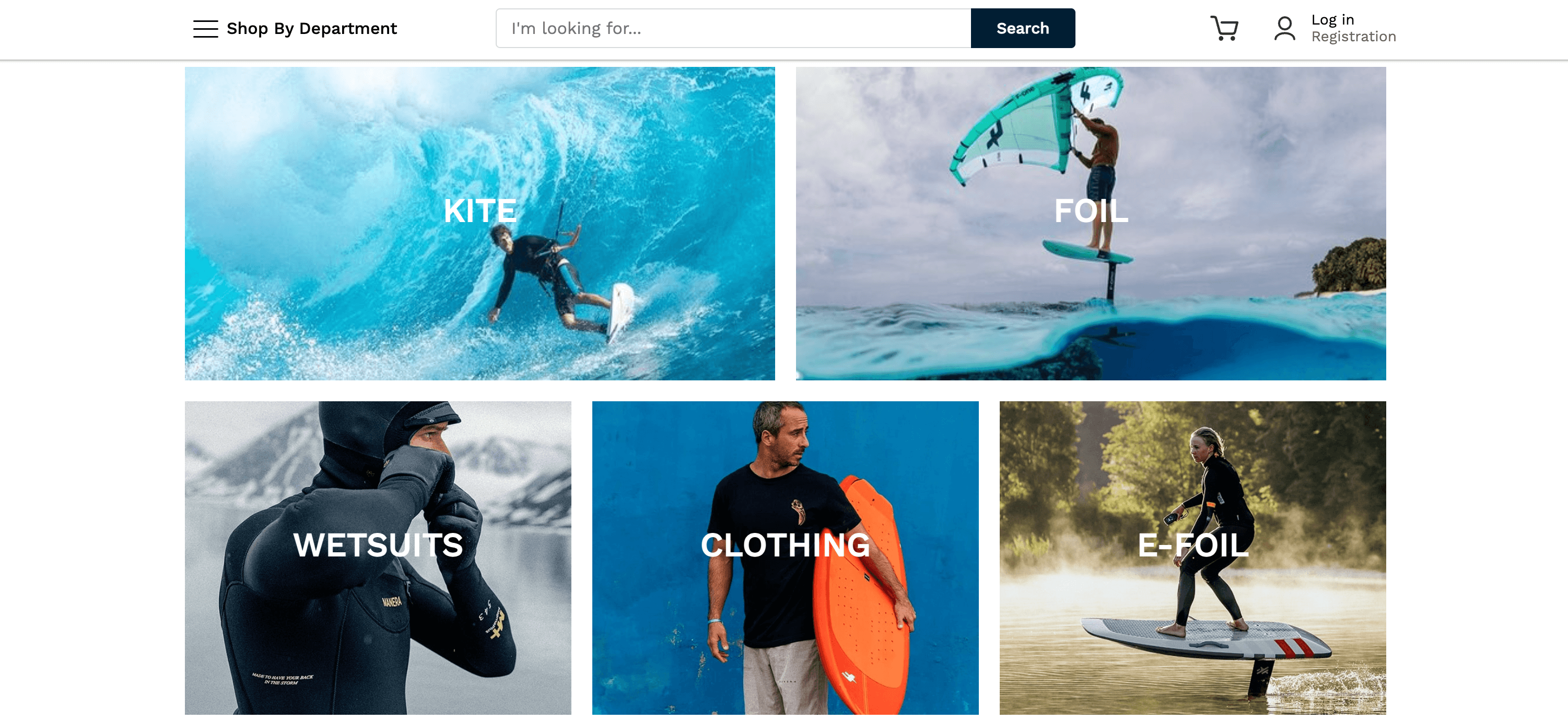
F-ONE Ukraine: Magento 1 to Magento 2 Migration Case Study
F-ONE Ukraine: Magento 1 to Magento 2 Migration Case Study
In March 2024, F-ONE Ukraine reached out to us with a problem that's becoming more common every month: their store was still running on Magento 1.
Magento 1 reached end-of-life in June 2020. By 2024, that meant nearly four years without security patches, performance improvements, or compatibility updates from Adobe. The store was working — customers could place orders — but every month on Magento 1 was a month of accumulating risk.
The brief from F-ONE was direct: migrate from Magento 1 to Magento 2, don't lose any SEO equity, and don't break anything that's currently working.
Two months later, we launched the new store with a 2-hour switchover window, every URL preserved, and PageSpeed scores of 98 desktop / 82 mobile. Here's how the project actually went.
Here's a recent project that demonstrates the framework in action:

The Starting Point: A Magento 1 Store Running on Borrowed Time
F-ONE is a French watersports brand specializing in kitesurfing, foiling, and wing equipment. The Ukrainian store had been built years earlier by an in-house developer and had stayed on Magento 1 long after most of the ecosystem had moved on.
The technical situation when we started looked roughly like this:
Outdated platform. Magento 1 had been EOL for nearly four years. No security patches, no compatibility with modern PHP versions, and a steadily shrinking pool of extensions still maintained for the platform.
Accumulated extension bloat. Years of "let's just install another module to fix this" had left the codebase with dozens of extensions, many of which were either no longer maintained, partially broken, or duplicating functionality.
Unmaintained custom code. The original in-house developer had moved on, taking institutional knowledge with him. What remained was custom code without documentation, written for a Magento 1 codebase that nobody else on the team fully understood.
Old frontend. The theme was a heavily customized Magento 1 design. Functional but dated, with mobile experience that didn't match modern customer expectations.
No clear upgrade path. Magento 1 to Magento 2 isn't a traditional upgrade. It's a migration — different architecture, different database structure, different theming system. You don't run a script and wait. You rebuild while preserving what matters.
We told F-ONE upfront: this would be closer to a rebuild than a rescue, but it would be done with their existing data, URL structure, and product catalog intact.
What We Set as Non-Negotiable Requirements
Before writing any code, we agreed on three constraints with the client:
1. Zero SEO loss. Every URL had to either stay the same or 301 redirect to its new equivalent. Meta titles, descriptions, structured data, sitemap structure — all preserved. The store had built up search rankings over years, and losing them in migration would have been worse than staying on Magento 1.
2. Minimal downtime. A multi-day downtime window wasn't acceptable. We needed a switchover plan measured in hours, not days.
3. Modern foundation. The new store had to be built on a current, supportable stack — not Magento 2.4.0 from three years ago. We targeted the latest stable version, with infrastructure that would still be supported five years from now.
These constraints shaped every technical decision that followed.
The Migration: 2 Months, 3 People, 4 Phases
The project ran for 2 months with a team of three — backend lead, frontend developer, and DevOps. Here's how the phases broke down.
Phase 1: Audit and Architecture Planning
We spent the first two weeks doing what most migration projects skip: a complete audit of the existing Magento 1 store before touching anything new.
This included a full inventory of products, categories, customer accounts, order history, custom attributes, and CMS content. We documented every extension, identified which had Magento 2 equivalents, and flagged which custom features needed to be rebuilt from scratch versus replaced with standard Magento 2 functionality.
The output was a detailed migration map: what moves directly, what gets rebuilt, what gets retired. This document became the reference for every decision in the following phases.
Phase 2: Building the New Magento 2 Foundation
With the map in hand, we built the new Magento 2 environment in parallel with the live Magento 1 store. The customer never saw any disruption during this phase because nothing was happening on production yet.
The new stack:
Magento 2 (latest stable version at the time of migration)
Luma theme as the frontend base, customized to F-ONE's brand
Redis for sessions and backend cache
Varnish for full-page caching
OpenSearch for catalog search
Modern hosting sized appropriately for current and projected traffic
We deliberately chose Luma over Hyvä for this project. F-ONE's priorities were migration safety and a quick path to launch. Hyvä would have been a strong choice for a longer-term performance project, but for a 2-month migration with a stable end goal, Luma was the right call.
Phase 3: Data Migration and Content Cleanup
Data migration is where most Magento 1 to Magento 2 projects either succeed or unravel. The data structures are different, so a direct copy isn't possible. Each entity — products, customers, orders, URL rewrites — has to be transformed and validated.
We used Adobe's official Data Migration Tool as the foundation, supplemented with custom scripts for the data that didn't map cleanly. Every step was tested against the live Magento 1 data, and we ran the full migration end-to-end three separate times before the actual switchover, each time fixing edge cases that emerged.
Alongside the data, we did aggressive cleanup. Years of accumulated extensions had left scripts, tracking codes, and abandoned configuration scattered across the store. The new Magento 2 environment launched clean — no dead code, no unused modules, no half-configured integrations from previous projects.
Phase 4: SEO Preservation and Switchover
The final phase focused on SEO preservation and the actual launch.
Every URL on the existing Magento 1 store was mapped to its Magento 2 equivalent. Where the URL structure was identical, no action was needed. Where it differed (admin paths, some category structures), we set up 301 redirects from the old URL pattern to the new one. The full redirect map was tested against a sample of high-traffic URLs from Search Console before launch.
Meta titles, meta descriptions, and structured data were migrated as part of the product and category data. We verified the sitemap structure, robots.txt, and canonical tag implementation matched the Magento 1 setup.
For the switchover itself, we scheduled a 2-hour window during the lowest-traffic period of the week. The actual cutover involved a final data sync from Magento 1 to Magento 2, DNS switch, and verification of critical paths (homepage, top categories, product pages, checkout, admin login). Total downtime: under 2 hours, with the store fully operational on the new platform by the end of the window.
The Results
After launch, we measured the new store against the constraints we had set at the start.
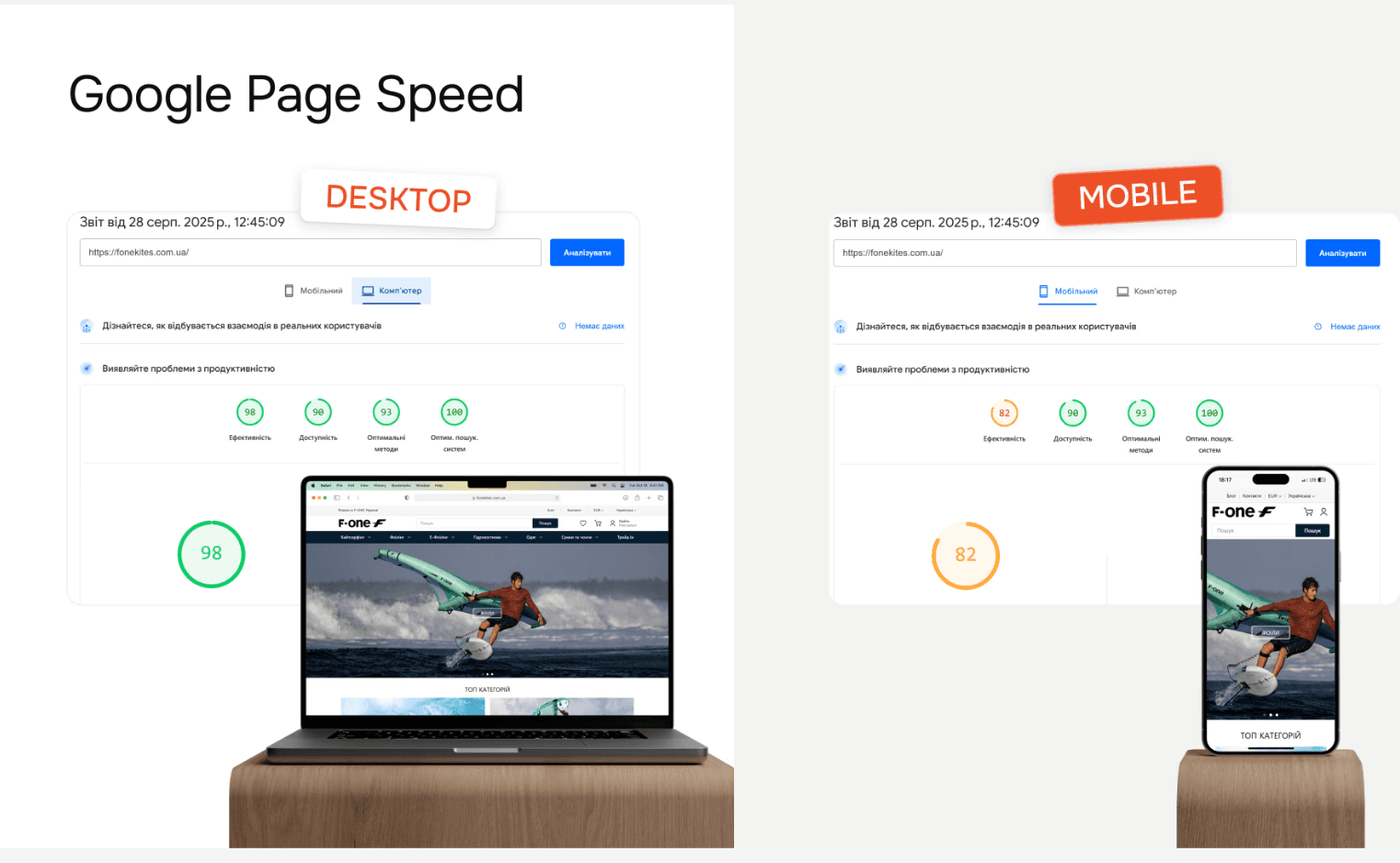
Google PageSpeed Insights:
Desktop: 98/100
Mobile: 82/100
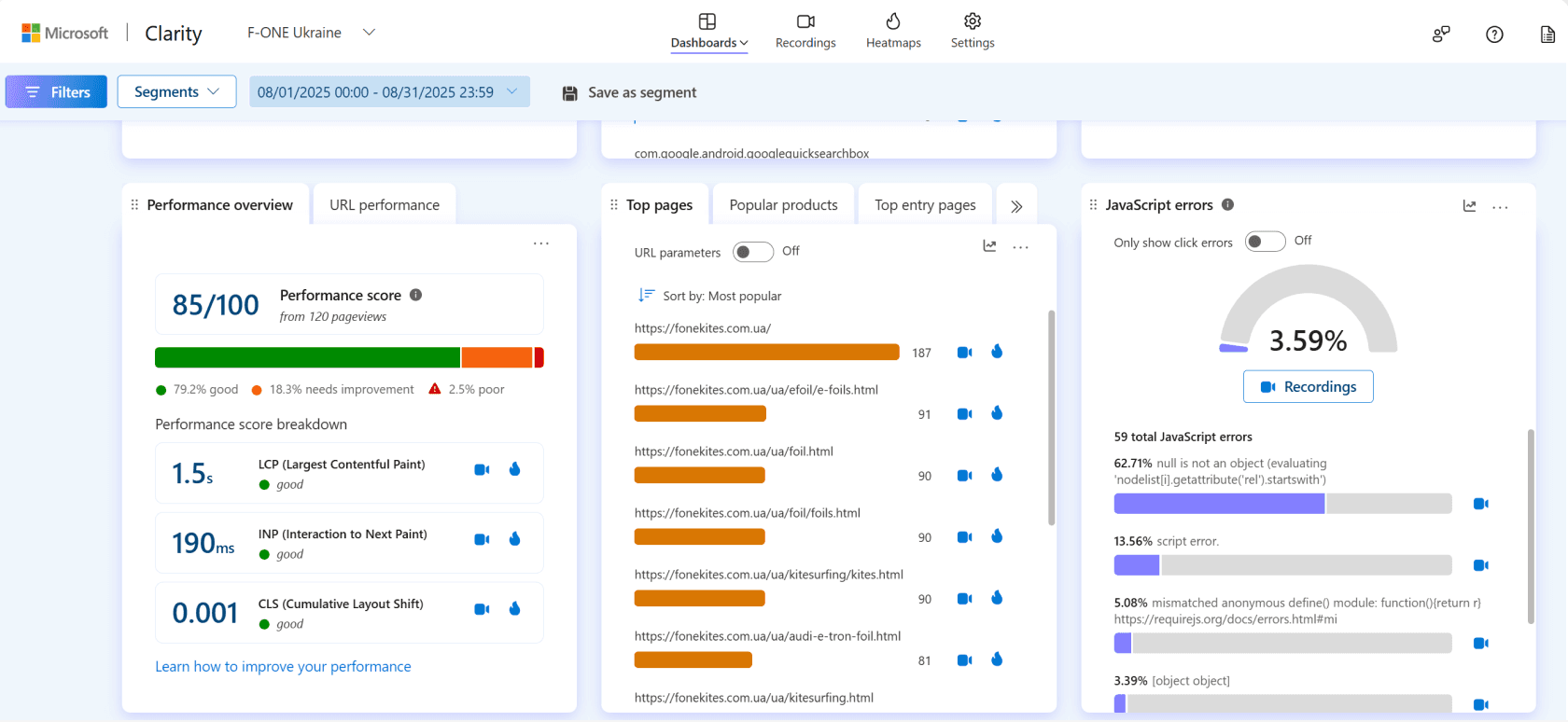
Microsoft Clarity (real user metrics, post-launch):
Performance score: 85/100
LCP (Largest Contentful Paint): 1.5s — rated good
INP (Interaction to Next Paint): 190ms — rated good
CLS (Cumulative Layout Shift): 0.001 — rated good
Beyond the technical scores, the operational outcomes mattered just as much:
SEO traffic grew after migration. Despite the conventional wisdom that migrations cause SEO drops, F-ONE saw organic traffic increase in the months following launch. The combination of preserved URLs, faster page speed, and modern Core Web Vitals scores worked in their favor with search rankings rather than against them.
Longer session duration. With faster pages and a cleaner mobile experience, customers spent more time on the site per session. Pages per session increased, and bounce rates dropped.
More functionality available. Magento 2 unlocked features the team simply couldn't access on Magento 1 — modern checkout, better admin UX, native support for current payment methods, and a much larger ecosystem of maintained extensions.
A platform that will be supported for years. This was the underlying business case for the entire project. Magento 2 has Adobe's continued support, regular security patches, and a clear roadmap. F-ONE's store is now running on infrastructure that won't need this level of intervention again for the foreseeable future.
Why This Migration Worked (Lessons for Other Magento 1 Stores)
If you're still on Magento 1 in 2026, the situation isn't getting better. Every month, fewer extensions remain compatible, security risk grows, and the cost of eventually migrating only goes up.
The lessons from this project that we apply to every Magento 1 to Magento 2 migration:
Audit before architecting. The two weeks we spent on audit before writing any code is what made the rest of the project predictable. Skipping this phase is how migrations end up taking 6 months instead of 2.
Build in parallel, not on top. Building Magento 2 alongside the running Magento 1 store — not trying to upgrade in place — keeps the live business running and removes time pressure from the development team.
Treat SEO preservation as engineering work. URL mapping, redirect logic, and metadata migration aren't afterthoughts. They're as important as the data migration itself, and they need the same level of testing.
Communicate constantly. Two months of migration work involves dozens of decisions that affect the client's business. Crisp communication — what we're doing, what's blocked, what we need from them — was as important as the code we wrote.
Pick the right frontend for the right project. Luma made sense here for migration safety and timeline. For a different project with different priorities, Hyvä might have been the answer. The point is to choose deliberately, not by default.
Should You Migrate from Magento 1?
Three questions to ask yourself if you're still on Magento 1:
1. How much risk are you carrying? Magento 1 has been EOL since June 2020. Every month adds compounding security and compatibility risk that doesn't show up until something breaks.
2. How much functionality are you missing? Modern payment methods, current SEO features, GA4 integration, mobile checkout improvements — most of these aren't available or aren't well-supported on Magento 1.
3. How much will it cost to do this in two years instead of now? Migration costs scale with how outdated your starting point is. A Magento 1 store in 2026 is more expensive to migrate than the same store would have been in 2022, and 2028 will be worse still.
If any of these questions feel uncomfortable, it's probably time to talk about migration.
Want to discuss your specific Magento 1 store? Book a 30-minute discovery call — we'll review your current setup and give you an honest take on migration scope, timeline, and cost.
Or read more about our approach: This case study demonstrates the methodology we cover in detail in How to Rescue a Magento 2 Store Without Rebuilding It — the four-stage framework we use on rescue and migration projects alike.
About the Author

Vlad Kozak is the CEO and Founder of StageM, a Magento development agency that has delivered 70+ Adobe Commerce and Magento Open Source projects since 2018. He was a featured speaker at Magento Meet Ukraine 2025, where he presented the four-stage Magento store rescue framework his team uses on projects like the F-ONE Ukraine migration.
More articles
Explore more insights from our team to deepen your understanding of digital strategy and web development best practices.




Load More